

1 leaves pricing unchanged. 0.8 applies a 20% discount. 1.2 applies a 20% markup.
Requires:
- Gateway version 2.7.0 or higher
- Backend version 1.15.0 or higher (for air-gapped deployments)
- Frontend version 1.8.1 or higher (for air-gapped deployments).
- Negotiated Discounts: Reflect enterprise contracts or committed-use rates from a provider on the corresponding Integration.
- Internal Cost Showback: Apply a markup so the cost reported to internal teams or workspaces includes your platform overhead.
- Custom Per-Integration Rates: Maintain different effective pricing across multiple Integrations of the same provider (e.g. a discounted production Integration alongside a standard-rate sandbox).
Adding Pricing Adjustments to an Integration
You can configure Pricing Adjustments directly from your Portkey dashboard, in the Basic Integration Details step.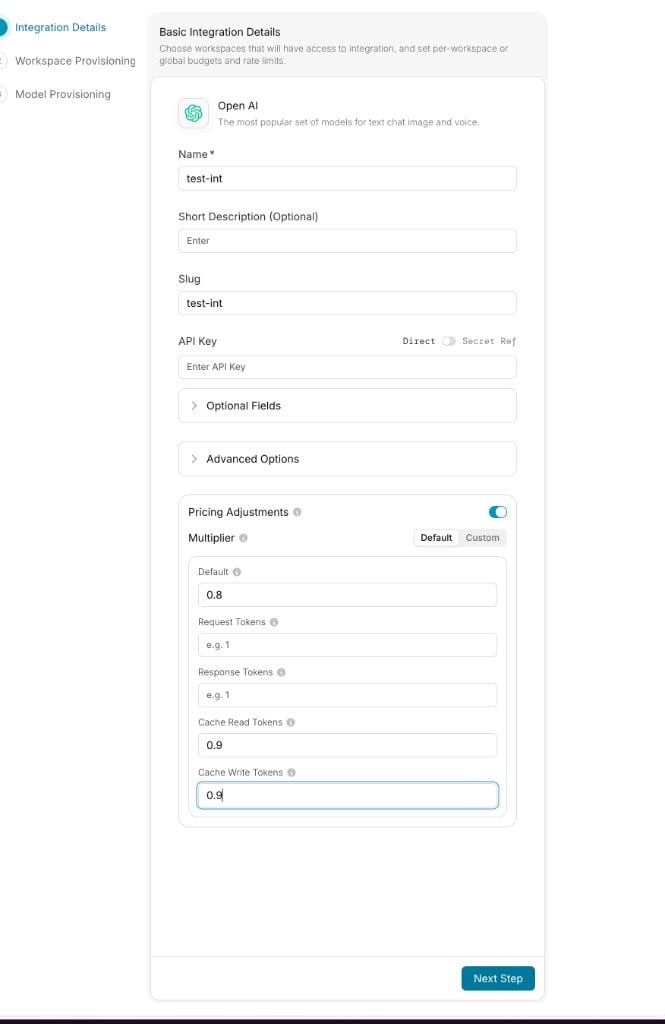
- Navigate to the relevant Integration in your Portkey account, and create a new Integration or open an existing one.
- On the Integration Details step, toggle Pricing Adjustments on.
- Choose a Multiplier mode:
- Default: Quick form for the most common token types.
- Custom: JSON editor for the full multiplier shape, including reasoning, audio, image, and additional units.
- Enter your multipliers. Empty fields inherit from
Default. - Save the Integration.
Configuration Fields
Default mode exposes the five most common multipliers:Default
Multiplier applied to every token type unless a more specific multiplier is set below. A flat 20% discount across the Integration is just
0.8 here.Request Tokens
Multiplier applied to input/request token cost.
Response Tokens
Multiplier applied to output/response token cost.
Cache Read Tokens
Multiplier applied to cache-read input token cost.
Cache Write Tokens
Multiplier applied to cache-write input token cost.
web_search — switch to Custom mode and provide a JSON object with the keys you want to adjust:
pay_as_you_go (or in additional_units) can be adjusted here.
Full multiplier reference
Full multiplier reference
Setting Pricing Adjustments via the API
You can also configure Pricing Adjustments programmatically through the Integrations API. Passpricing_adjustments when creating or updating an Integration. Send null to clear all adjustments.
- cURL
- Python